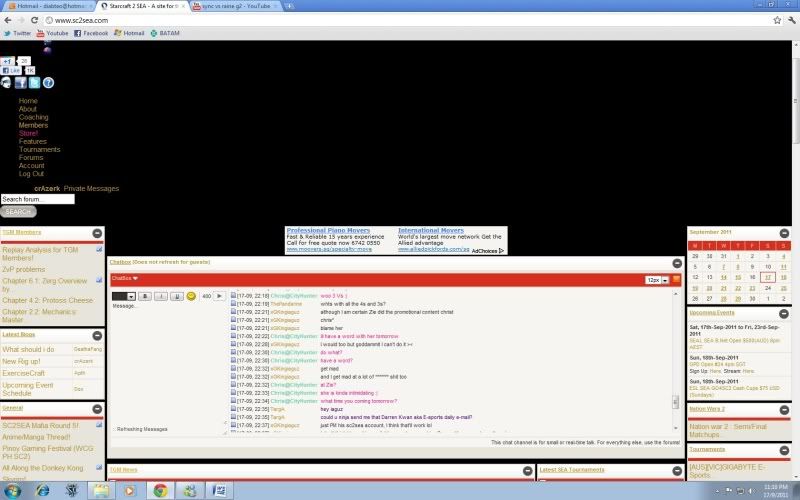
Hey any Google Chrome users having issues with viewing the site? For me it occasionally turns up funny, and has only started happening after the recent server shift. It's happening for both my laptop and my brand new desktop as well, so it's not an isolated case :/
This is an example of turning up funny:
UPDATE:
An explanation of the cause of the issue + a (temp?) fix by xpaperclip!
OK, I think I know what the problem is, but I don't know how vBulletin handles styles so I don't know how it should be fixed properly.
It turns out there are two non-trivial stylesheets that get included on each page. One is the red-looking thing, and the other is the main 'blue.css' stylesheet where almost all of the red is overriden. However, the blue.css one is declared as "alternate" which means it can be switched out. In Firefox you can actually see the effect by going to View -> Page Style and switching the alternate off.
The problem can be made to occur on WebKit-based (Chrome, Safari) browsers because it seems that, while it normally chugs along and just treats it normally, it seems that if the style comes too slowly, it just gets ignored. So Ctrl+F5 refreshing can actually work against you as it downloads everything again, and the blue.css comes toward the end on my machine, which means it may come late again.
Actual solution: make blue.css a non-alternate stylesheet. I have no idea how you get vBulletin to do that, so on this one, nirvAnA, you're on you're own!
P.S. Didn't know Firefox actually has UI for switching alternate stylesheets, learnt something new today!
Last edited by crAzerk; Sun, 18th-Sep-2011 at 4:29 PM.
Hey man, the site ended up looking just like that on Chrome on my Macbook Pro. But on my Windows desktop, using Chrome, it's fine. Does this not happen in other browsers?
Lol I've been having the same problem since I sent my com to be repaired :P. It goes away once I refresh the page but will almost definitely come back whenever I open sc2sea again.
OK, I think I know what the problem is, but I don't know how vBulletin handles styles so I don't know how it should be fixed properly.
It turns out there are two non-trivial stylesheets that get included on each page. One is the red-looking thing, and the other is the main 'blue.css' stylesheet where almost all of the red is overriden. However, the blue.css one is declared as "alternate" which means it can be switched out. In Firefox you can actually see the effect by going to View -> Page Style and switching the alternate off.
The problem can be made to occur on WebKit-based (Chrome, Safari) browsers because it seems that, while it normally chugs along and just treats it normally, it seems that if the style comes too slowly, it just gets ignored. So Ctrl+F5 refreshing can actually work against you as it downloads everything again, and the blue.css comes toward the end on my machine, which means it may come late again.
Actual solution: make blue.css a non-alternate stylesheet. I have no idea how you get vBulletin to do that, so on this one, nirvAnA, you're on you're own!
P.S. Didn't know Firefox actually has UI for switching alternate stylesheets, learnt something new today!
My firefox looks identical to the OP when it's halfway through loading the page... chances are this is just something intermittent with your browser/internet connection/prox/firewall causing the page to stop loading.
Yeah this has been happening for a couple of weeks now with Chrome on my desktop. Ctrl+F5 doesn't tend to fix it. The fix from xpaperclip seems to work pretty well though, cheers!
Nope it seems to only occur on Chrome. Mine fixes itself randomly so I'm not quite sure what's happening haha. I did what xpaperclip suggested anyway, hope it won't happen again. (or will it? lol)
It's definitely only a workaround, not a proper fix, so unfortunately, it'll probably re-occur. In fact, ever since you mentioned it, it's happening to me more often!
The styles on this site are still kind of messed up. When I get some decent free time (in, like, maybe a month ), I'll go through and clean it up if it's OK with the admins.
If it still happens a lot for you (i.e. me, now that crAzerk has mentioned it), I've made a small Greasemonkey script to force a reload on the blue.css. Should install for Chrome by just going to the link.
Totally untested aside from me refreshing the pages a few times, so don't install this unless you have continuing issues. (Edit: Not because it's dangerous, but it could cause certain things to download twice unnecessarily and make the page a bit slower.)
Even the smallest donations help keep sc2sea running! All donations go towards helping our site run including our monthly server hosting fees and sc2sea sponsored community tournaments we host. Find out more here.