SC2SEA.com - Starcraft 2 SEA eSports Community Site


  • Home
  • About
  • Streams
  • Features
  • Tournaments
  • Forums
SC2SEA.com - Starcraft 2 SEA eSports Community Site > General Forums > General > Tt eSPORTS Knucker Community Testing - TESTERS FEEDBACK THREAD

About Us
An Overview of sc2sea
About Us
Contact us
Join our team!
Features
Live Streams
Replays
SEABets
Site Achievements
Articles
Article Archive
Who's Who
sc2sea.com Weekly Tournaments
Tournaments
Every Saturday BSG Open - (Bronze, Silver, Gold)
Every Sunday GPD Open - (Gold, Platinum, Diamond)
Monthly Sunday Masters Cup
Oseanic Championship Series 2015
Point Standings
The Grandmaster Manual
1. Introduction
2. Basics
3. Advanced
4. Anti-Cheese
5. Protoss
6. Zerg
7. Terran
8. Summary
9. Bonus Content!
Coaching
TGM Member Only Forums
TGM Official Coaches
Misc
Help us Rate TGM!!
Suggest what you'll like to see!
Need help? Contact Support!
Community Links
Members List
Search Forums
 
Advanced Search
Search Downloads
Advanced Search
Go to Page...
Community
House Clans
Clans
No recent threads.
Community
No recent threads.
Tournaments
No recent threads.
Latest Blogs New
tier list of people...
asdfSchnitzel
My Life Was Turned...
Sc2Clare
I've been playing...
SLCN.Wally
My Starcraft/eSpor...
syfChadMann
My Starcraft/eSpor...
syfChadMann
General
Stickied Threads
No recent threads.
General Threads
No recent threads.
StarCraft II
Starcraft General
No recent threads.
Strategy Discussion
No recent threads.
BSG Discussion
No recent threads.
Other Games
Other Games
No recent threads.
Sports
No recent threads.
News
News Archive
No recent threads.
Tournament News
No recent threads.
Articles Archive
Replays
Photo Gallery
Mark all forums as read
Reply
Display Modes
Thread Tools
Unread Mon, 20th-Aug-2012, 12:15 PM BnetId: mayo.987  Race: Clan: 3h  Location: Melbourne, Australia  Total Posts Made: 992 # 1
Mayo
Tt Manager
Mayo's Avatar
Tourneys Joined: 2
Tt eSPORTS Knucker Community Testing - TESTERS FEEDBACK THREAD

Hey guys,

This is the thread for everyone to post their user reviews, I ask kindly for NOONE bar the testers to post until all tester reviews are completed (I'll make a post then).

This is so we can keep the thread clean and all of the legitimate testing responses at the top of the pile.

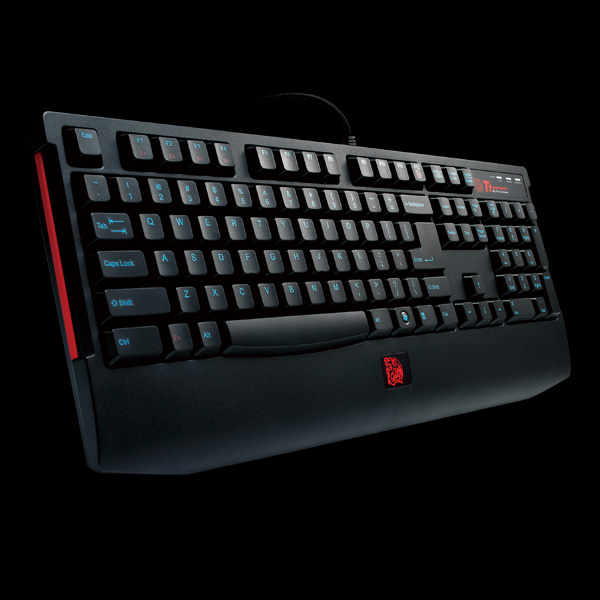
Click the image to open in full size.

Once again I remind testers that we require:
- Minimum 2 paragraphs on testing/thoughts of the product
- A list of pro's and con's of the mouse
- A rating out of 10
- Honesty in your opinions

I trust you all had a blast with your keyboard, please ensure you post your results ASAP. For those of you in New Zealand, I realise the post took forever, so please feel free to test the board and post your response on Wednesday night.

The approved testers list is as follows:
Quote:
08AUG2012

I'd like to announce the winners:

1. xGKing.Pokerface
2. IrisAnother
3. TADivinity
4. ToRSpartaz
5. Joel D. (No gamer name supplied)
Thanks!

Note: Can I please ask moderators to remove any posts that are not made by the testers until I give the all clear? Thank you
___________________________________
Made in
www.facebook.com/smithymayo
www.twitter.com/smithymayo
Mayo is offline Send a message via Skype™ to Mayo   OLD POST Reply With Quote
Mayo
View Public Profile
Send a private message to Mayo
Find all posts by Mayo
Unread Mon, 20th-Aug-2012, 1:15 PM Who's Who:   Total Posts Made: 364 # 2
AvPoker
Default Avatar
Tourneys Joined: 16
SC2SEA Supporter!The Nightman Cometh
Achievements (2)
Well this is awkward. Copy pasta time!

Disclaimer: This is my first review of anything in life, so please excuse the possible unreviewlike nature of my review. Thank you for your understanding.

+ [Review] +
Click the image to open in full size.

The first thing that caught my attention was the artwork of the box. Most notably that handsome man in red pointing at the knucker keyboard, which I can rightfully claim. If I were to see this box somewhere in some store, there’s no way I could resist escaping the gravitational pull of the sexiness of the keyboard and Hermes. Onto the review:

Click the image to open in full size. Click the image to open in full size.

As with most keyboards, the Knucker keyboard comes with a PS/2 adapter allowing it to be compatible with most computers. It also comes with eight red keys for the direction and WASD keys, provided for visual convenience for first person shooter, platform or other games that require direction keys. I did not find the need to use these keys as I mostly play Starcraft (its pretty good and you should try it). Nevertheless it’s a handy little feature.

The black ring in the picture with two hooks hanging out of it is key puller, presumably used to replace the black keys with the red ones, or to remove them in order to clean out any dust hiding beneath the keys. The key puller is surprisingly effective at pulling out the keys just by simply pushing the hooks into one of the key, then pulling it out. Above that is some installation guide, warranty etc etc etc. Now onto the keyboard itself:

Click the image to open in full size.

Compared to the TteSPORTs challenger which I’ve been using for the past months or so, the Knucker keyboard was aesthetically pleasing to look at, at least in my opinion. The blue ink in contrast with the black colours of the keyboard match the colours of my blue razer copperhead with the TteSPORTs Dasher mousepad, which I thought was nice. Of course, not everyone owns the convenience of having matching coloured attire at their disposal.

Click the image to open in full size.

What I also found was interesting was the size of the cord. Again, in comparison with the TteSPORTs Challenger, the cord is around twice as thin in diameter whilst being around the same length (for practical purposes ofc). Although I have only experienced this keyboard for less than a week, the cord seems sturdy enough to prevent me from worrying about it breaking off. But that’s fine, because I heard warranty is pretty good.

Click the image to open in full size.

In terms of the keyboard’s features, it is similar to its early predecessors, replacing the windows key on the bottom left with the function key. This may be off-putting for some users that prefer to use the windows key in conjunction with others for easier maneuverability, but as a gaming keyboard this feature is justifiable. Instead of having the function hotkeys from the f1 to f12 keys being shortcuts to media players (such as pause, play, rewind, fast forward etc), only four shortcuts from f1 to f4 remain, which is used for some sort of repeat rate adjustment. I had no real use for these keys (nor do I know how they even work), so as a Starcraft player, don’t pay attention to them.

Also, there is a function key on f12 that controls whether it lights up the ‘dragon’ on the bottom of the keyboard. That was pretty cute.

Click the image to open in full size.
"Is a dragon?

Onto the feel of the keyboard. Unfortunately I have not experienced mechanical keyboards for long enough for me to remember how it feels. However, I can say this plunger technology is a great improvement of keyboards such as the TteSPORTs Challenger. It is easier to type, more responsive, quieter and overall impressive. If I had to choose between a mechanical keyboard and this one, I’d go for the Knucker keyboard just because it gives me everything I need and at a much cheaper price.

Overall the TteSPORTs Knucker keyboard is a very worthwhile purchase, resembling the mechanics of a mechanical keyboard while being much more affordable at $49. It is by far the best keyboard I have experienced and I am glad to be able to experience such a treat for years to come.

Click the image to open in full size.
Herme's Seal of Approval


+ [Overall] +
Pros:
- Hermes
- Aesthetically pleasing
- Easy to type
- Quiet
- Dragon

Cons:
- Replacing windows key may be unsettling for some
- Blue and red may not be the favourite colours for some
- Repeat rate functions have limited practical use (at least for starcraft)
- Is a dragon?

Overall score: 9/10
AvPoker is offline   OLD POST Reply With Quote
AvPoker
View Public Profile
Send a private message to AvPoker
Find all posts by AvPoker
Unread Wed, 22nd-Aug-2012, 6:11 PM Who's Who:   BnetId: Spartaz. 780  Race: Clan: ToR  Location: Auckland, New Zealand  Total Posts Made: 2,184 # 3
ToRSpartaz
Leader of ToR
ToRSpartaz's Avatar
Tourneys Joined / Won: 15/1
Best New Clan (2011)
Community BuilderUnearthed Talent
Achievements (2)
Hey guys, Ill just do a general overview for those who want the pros and cons of the product cutting straight to the point .

+ [Summary (Overview User experience)] +
Advantages:

- Really good adaptability (Switching from previous keyboard)
- Comfortable positioning for wrists
- Neat and Clean keyboard layout
- Effective responsiveness of Keys
- Affordable (Really was impressed by the price)
- Stable and well built (Not flimsy and plasticky - That a word? O_o)
- Nice packaging design

Disadvantages:

- No Backlight
- Windows key has been switched around
- Wrist rest marks easily
- That key next to the question mark takes time to get use to.

Overall rating 8.5/10


If any one really wants to read my response of this product Ill post it here

+ [Wall of text (Full Response)] +
Well as soon as I got it, I came home after a long days work to see the package sitting upon my bed. (Postage was incredibly steep, which makes me appreciate it even more Mayo)

Click the image to open in full size.

First point I am going to make is about the overall design about the packaging. I found it really sick to look at. When I opened up the packaging and saw the photo above, I was quite excited to see what the actual product was like itself. I think the Hermes endorsement is a pretty feature of the box, it added a lot of value to the design. Was pretty slick the way that he was pointing so casually with the flick of his thumb towards the keyboard. nice effect.

Something I found really beneficial about this design was the wrist support. In the past the keyboards that I have used (Mainly logitech ones) haven't had that built in comfort/support for long term use. I think its a really decent feature to have, I am visibly seeing the difference, considering the last time I went for a long period with my old keyboard I went into work the next day with wrists that were causing me a lot of pain.

The keyboard layout is another feature of this design I found to be really good. In terms of the layout, it was good in the sense that it allowed me to transition from a keyboard I have been used for near on 2 years now in the space of about 6 hours of usage. So its quite easy to get the feel for in a short period of time without a doubt. Aside from one key that always frustrates the hell out of me when I hit it , which is the \ key in place of the "?". But otherwise its really good.

Having not much experience with mechanical keyboards, I think I have had my eyes opened to the benefit of using a mechanical keyboard. The responsiveness of these keys really impressed me and the plunger technology I find to be really nice and smooth.

I can now see what some of the other members of the Sc2sea community mean now. Back a few months ago, when I was on the look out for a new keyboard I asked the question, "Which one do you guys prefer?" and now I can come to appreciate what some of them meant. I have used the Black Widow at a mates place and in terms of the quality and how well the Knucker is built, I feel that it is a lot stronger and more durable. It doesn't havent that plasticky feel to the design, it really does feel quite nice too use.

Finally bringing my positive points to a close I was REALLY impressed at the price. $49 AUD for a keyboard of this quality feels to me like a steal. Not only is it affordable I feel as though it is even better quality for money. Im not so sure about the New Zealand price comparison, but I know I am not willing to pay in the region of $200 for a decent gaming keyboard >< It really allows the casual gamer/uni students to have the feel of a mechanical keyboard.

Some of the things I think would be cool if they were different are more in terms of the design of the product itself.

Backlight would be a really cool additional feature to the product I think, considering a lot and I mean a lot of gamers do play in pretty dim lighting, it would be a lot easier on the eyes for players if it was backlit, I think the increase in price would still be worth it for the product. But in terms of how it looks, it still adds that kinda true and positive gaming experience with a backlit keyboard ^^

The only other issue I found that drove me a bit crazy was the marks that I find on the wrist pad after use. Its not as bad as a matte finish I suppose, but it still drives me a bit crazy. Even after just writing this review there is one down the middle and two to the right. Haha I suppose thats me being a bit pedantic.


Thank for the opportunity Mayo, I hope that isn't too bad a review Tt eSports fighting!
___________________________________
Nick "ToRSpartaz" Simpson


Twitter: l ToR Website: l Facebook
ToRSpartaz is offline Send a message via Skype™ to ToRSpartaz   OLD POST Reply With Quote
ToRSpartaz
View Public Profile
Send a private message to ToRSpartaz
Find all posts by ToRSpartaz
Unread Wed, 22nd-Aug-2012, 9:14 PM Location: Adelaide  Total Posts Made: 89 # 4
FaMe
FaMe's Avatar
Already posted in old thread, haha.

Quote:
Sadly I missed the package arriving on the Friday, so had to wait till Monday to get it!
It's a very nice box, haha. Although I can't comment on Racing Game's (Preferring to use a Racing Wheel), Hermes' review of the keyboard was well written and only made me want to test the keyboard out more.

I also liked the fact that upon opening the first fold of the box you were greeted with a relatively large sized keyboard overlay with functions of the keyboard pointed out. Another fold, and the keyboard is unveiled. Packaged with the keyboard include's a booklet regarding the installation of the keyboard (More on this later), a booklet regarding the warranty information, two TT Dragon stickers and two very nice extra's: Red WASD and Arrow key's (& a Key Remover), and a PS/2 adaptor.
Everything was very neatly packaged, another thing I was glad to see was that the Keyboard's cable (which was tucked away at the top of the box) was braided and had a small strap (detailed with the TT logo) to cleanly wrap away any excess cord.

The overall design for the keyboard is very nice and simple, nothing fancy regarding LED's, backlighting or macro/media keys which for the price is pretty standard.

On to the keyboard usage!
I plugged the keyboard in, and it worked immediately without the need to install any driver's etc. which was a nice change (though making the installation booklet relatively useless for anyone aware of a USB port?).
The 'plunger technology' regarding the key press action wasn't too noticeable, however that may have simply been me (Personally I found the key's very similar to the Roccat Isku).
Sadly I can't comment on the switchable repeat rate due to not using the PS/2 adapter, and i'm not entirely sure on what it would do for game's such as SC2/Dota2/LoL, though that's assuming it work's the way I think it does.
I'd also like to point out that the keyboard sat very stable in both the flat and the up-right position, and it was nice to see the tab's on the back had a rubber grip for extra hold.

One annoyance I did have was the lack of a left Window's key, though I understand a number of gamer's prefer to remove it or not have it entirely, i'm just very accustomed to using it. Obviously that's a minor gripe though, and seeing as this is a gaming keyboard it's understandable to not have it.

Outside of gaming usage I had another minor annoyance in having no macro key's as I use them relatively often in some design software for automated actions, again just personal preference.

Pro's:

Extremely affordable at only $49!
Very solid, without being heavy.
Simple, compact design.
Very comfy to use, the key's don't require a lot of force enabling you to make quick keystroke's.

Con's:

No backlighting, which made it somewhat annoying to use late at night by comparison.

Rating:

I'd have to give it a 7/10, regarding gaming outside of MMO's the keyboard has everything you need and it really is such a great price at $49.
FaMe is offline   OLD POST Reply With Quote
FaMe
View Public Profile
Send a private message to FaMe
Find all posts by FaMe
Unread Thu, 30th-Aug-2012, 11:04 PM Who's Who:   Race: Clan: Iris  Location: Wellington  Total Posts Made: 394 # 5
Another
Another's Avatar
Tourneys Joined: 4
Sorry this is a bit late, i recieved it late (due to the NZ post service being unable to access my building, and then sending it about 20km away from me to collect) then had to go home for a weekend for family issues, and since mayo wants a week of testing i thought i would do that instead of doing it half assed.

My first impressions was the hand rest at the bottom, it is incredibly big and intrusive, i dont know of any other gaming keyboards that have this and it really gets in the way, a week later and i still find it very annoying. There is no windows key on the left either, there is a FN key that can be used to turn the dragon light on and off, but im not really sure other than that. Reading the installion guide it appears it changes the repeat rate, seems like a very small trade off for getting rid of a vital key.

For actual gaming use the keyboard is nice, TT described it as a ergonomical that feels like a mechanical, and i think this is right. Its very comfortable to use, however it doesnt have the drawbacks of a mechanical, its very quiet and it is just a fraction of the cost. in between the "/" key and the right shift, there is another key, a "\" key. While at first this seems logical and useful, i keep missing the question mark key as there is a new key between them, while it isnt a major thing, it is annoying to get used to and will be hard to use a differnt keyboard, whether its work an internet cafe or someone elses computer.

The design is very nice, i like the use of color on it, and the dragon light looks very cool. A very nice feature is that they include a 'key getter outerer" basically a tool for removing keys, and some spare keys of different colors. While it obviously doesnt affect the performance of the keyboard, it is nice to be able to change the color of some keys. The keyboard uses a ps2 port, but also has a USB option. Im not entirely sure of the difference, but i think its to do with the repeat rate. As a sc2 player, i obviously have it set as low as possible in the control panel, but for players of other games it may hold some use. There are no macro keys on the side, while many find this useful for certain games, as a sc2 player i wont even consider using a keyboard that has these, they just get in the way and you cant use them anyway.

Pros:
- Keys are very nice, feels similar to a mechanical.
- Low cost despite the mechincal feel (only $49)
- No macro keys.
- Looks pretty cool
- Has a dragon

Cons:
- theres no left windows key, and the key in its place is almost useless.
- An extra key near the right shift making it hard to make a "?"
- The handrest at the bottom of the keyboard is very annoying and out of place as they arent used on gaming keyboards in general
- Even with the back supports used, the angle isnt what im used to, i dont imagine it would be too hard to get more than one option instead of just up or down.

Overall i think its a good keyboard for its price, probably one of the best keyboards out there for its price in fact. However, if you spend more you are going to get a lot better keyboards.

I would give it a 6/10.
___________________________________
Known for a time as Phantom
https://https://twitter.com/fray_Phantom
Another is offline   OLD POST Reply With Quote
Another
View Public Profile
Send a private message to Another
Find all posts by Another
Unread Mon, 29th-Oct-2012, 5:22 PM BnetId: TADivinity.650  Race: Clan: TA  Location: Sydney, Australia  Total Posts Made: 332 # 6
TADivinity
TADivinity's Avatar
Tourneys Joined: 13
Divinity's review of the Tt Knucker

1. Receive keyboard and promise to review
2. Don’t review
3. Finally review and bump thread so everyone sees it again and product is refreshed in everyones mind
4. ???
5. Tt Profit!!


Unique Knucker facts
Im going to try and keep it short and sweet. IMO, two major facts need to be considered when reviewing this keyboard: a) it's not a real mechanical keyboard. b) It's $50.00 (aka *cheap*.) Given what the other 4 above have said, Im going to specifically focus on the feel of the keyboard – and compare it to mechanicals (which, please remember, cost $100 to $150).

Addressing point a):
There is no doubt in my mind that this is better than any rubber-dome you can find. The best way I can describe the feel is the noticeable key-press similar to a Brown mechanical switch, its nice and soft, but you still *feel* the compression. However, the lack of tactile bounce-back on the Knucker's keys is where real mechanicals shine. Also, the Knucker does not give a nice, satisfying feeling when you bottom out the key (**In comparison to a mechanical). In saying all of this, the feel is still a nice soft, relatively tactile (at the start of the keypress anyway) feel – and I believe it trumps the feel of any rubber dome.

Two things that I personally dislike about this keyboard:
1. Its palm rest gets in the way. It forces your palm to sit rather high, with keys which are actually quite small and low in the keyboard. Now, please note, this may be a personal qualm as a result of me hotkeying 'Alt' key for all of my Hatchery's, and pressing it with my thumb. Having an inclined palm seems to really make this not work so well.

As the next two photos show, in comparison to my Filco, there is no palm rest on the Filco that gets in the way, and as such, my hand sits quite low. I believe this decreases the distance between my fingers and the keys, which gives a preferable comfort.

+ [Photos comparing palm-rest] +
Click the image to open in full size.


2. In combination with the palm rest (which probably causes this qualm too) – the keys are very flat, and there is a lack of incline between each row (As the above photo also shows). This could again be a result of my habits whereby I am used to a low palm with higher keys that incline towards my fingers. But I have to say it really took me some getting used to – and some miss-pressed keys.
See pics below as well. Notice I put the Knucker on its back legs to push it up a bit and decrease the effects of this. I believe it is far too flat without its legs up.

+ [Photos showing key-incline] +
Click the image to open in full size.


Addressing point b): (i.e. why you should buy this keyboard)
Of the 423 words I have written so far, 206 have been dedicated to what I don’t like. But here is the balancing factor:

The Knucker costs $50.00. The Filco that im comparing it to costs $150.00.

As such, this is my conclusion: If you do not want to fork out for a *real* mechanical, then this is the keyboard you should be buying. Without arguing why mechanicals are superior (an easy argument to win), this is the closest you will get. It provides you the cheap-ass price that you are willing to pay (or all you can afford), and it will get you closer to the quality of a $100 to $150 keyboard more than any other.

Finally, the keyboard comes with your standard Tt eSPORTS / gaming peripheral marketing shazam with striking colours and design, the Fn key, stickers, and all that other jazz that comes with these brands – ill leave it to the other 4 above to show you these things. In terms of macro keys – you don’t need these. Youre a starcraft player.

TLDR

Given this, I have to give it four ratings:

In comparison to all mechanicals in terms of build quality / feel / board design alone : 3/5.
In comparison to all mechanicals in terms of build quality / feel / board design AND PRICE : 4/5.
(In the end, forking out for the top shelf is worth it in my personal opinion)


In comparison to all other keyboards in terms of build quality / feel / board design alone: 5/5.
In comparison to all other keyboards in terms of build quality / feel / board design AND PRICE: 10/5.
(I understand not everyone can afford top shelf. In that case, this is your keyboard. Its freaking $50.00. Go mow your neighbours lawns for a weekend and you'll have it in no time hahah)

Quick Comments
 FLuX:  
Your 3rd step certainly worked for me!
 TCPKiaSu:  
same
___________________________________


I wanna be
The very best!
Like no one ever was
Dooo dooo dodo!

Last edited by TADivinity; Mon, 29th-Oct-2012 at 5:28 PM.
TADivinity is offline   OLD POST Reply With Quote
TADivinity
View Public Profile
Send a private message to TADivinity
Find all posts by TADivinity
Unread Wed, 31st-Oct-2012, 1:42 PM BnetId: mayo.987  Race: Clan: 3h  Location: Melbourne, Australia  Total Posts Made: 992 # 7
Mayo
Tt Manager
Mayo's Avatar
Tourneys Joined: 2
Thanks for the review mate

Fun fact, Creator and MarineKingPRIME both use this keybaord now. Creator also used it to win WCS Korea.
Click the image to open in full size.

Click the image to open in full size.
___________________________________
Made in
www.facebook.com/smithymayo
www.twitter.com/smithymayo
Mayo is offline Send a message via Skype™ to Mayo   OLD POST Reply With Quote
Mayo
View Public Profile
Send a private message to Mayo
Find all posts by Mayo
Unread Wed, 31st-Oct-2012, 2:07 PM Who's Who:   Race: Clan: Iris  Location: Wellington  Total Posts Made: 394 # 8
Another
Another's Avatar
Tourneys Joined: 4
i guess a few weeks/months later from me, still using it, havent gone back to my old one, serves me well. thanks Tt !!!
___________________________________
Known for a time as Phantom
https://https://twitter.com/fray_Phantom
Another is offline   OLD POST Reply With Quote
Another
View Public Profile
Send a private message to Another
Find all posts by Another

Reply

« Previous Thread | Next Thread »

Thread Tools
Show Printable Version Show Printable Version
Email this Page Email this Page
Display Modes
View All Posts View All
Linear Mode Switch to Linear Mode
Hybrid Mode Hybrid Mode
Threaded Mode Switch to Threaded Mode

Similar Threads
Thread Thread Starter Forum Replies Last Post
Tt ePSORTS Theron Community Testing - TESTERS FEEDBACK THREAD Mayo General 42 Sat, 1st-Sep-2012 8:43 AM
Tt eSPORTS Knucker Keyboard Giveaway & Community Feedback Mayo General 49 Mon, 20th-Aug-2012 12:18 PM
Eve Cup Feedback Thread EveGaming Starcraft 2 General Discussion 15 Tue, 15th-May-2012 10:33 AM
Tt eSPORTS Theron Mouse Giveaway & Community Feedback Mayo Latest News 89 Fri, 17th-Feb-2012 8:57 AM
[SG LAN] SSL Feb Pre-Thread / SSL Jan Feedback HDPhoenix Tournaments 5 Sat, 5th-Feb-2011 2:24 AM

Events
Upcoming Events Add
No events scheduled in
the next 7 days.
OSC SEA Participation Bonus
Live Streams
No streams online.
Open SEABets
No open bets.
2015 OSEANIC Series
Latest Results
Americas Open #110 KeeN
OSC SEA Weekly #24 Probe
SC2Online Comm Open #38 aLive
February EU Ladder Heroes Nerchio
February NA Ladder Heroes TRUE
ANZ Cup #12 iaguz
Filthy NA Weekly #16 Semper
Proxy Tempest Open #43 PiLiPiLi
Top 20 OSC Rankings
1ByuN
2Seither
3DemiLove
4PiLiPiLi
5Kelazhur
6Cham
7iaguz
8aLive
9Solar
10KeeN
11EnDerr
12KingkOng
13TRUE
14GuMiho
15Probe
16puCK
17Snute
18PandaBearMe
19PiG
20Ryung
Full Point Standings
Earn extra points with Challenge Matches!
Bounties
Defeat these players and collect the $'s!
ByuN$100
INnoVation$75
Solar$75
Neeb$60
herO$50
GuMiho$50
Nerchio$50
TRUE$50
uThermal$50
Kelazhur$40
MajOr$40
Scarlett$40
Snute$40
aLive$30
Bly$30
iAsonu$30
KeeN$30
PiLiPiLi$30
puCK$30
Ryung$30
Cham$25
Cyan$25
iaguz$25
Guru$25
Seither$25
Semper$25
JonSnow$15
PandaBearMe$15
Probe$15
Latest Collected
Yours 2-0 Neeb $60
SC2ONLINE Comm Open #38
Azure 2-0 Seither $25
ANZ Cup #12
Cham 2-0 Cyan $25
OSC All Stars #24
FuturE 2-0 KeeN $30
ESL Americas Open #109
Donations
Donate using Paypal!

Even the smallest donations help keep sc2sea running! All donations go towards helping our site run including our monthly server hosting fees and sc2sea sponsored community tournaments we host. Find out more here.
Home - Contact Us - FAQ - Members List - Advertise - Terms of Service - Top - Mobile-friendly (alpha)
Powered by vBadvanced CMPS v3.2.2
Powered by vBulletin® Version 3.8.7
Copyright ©2000 - 2026, vBulletin Solutions, Inc.
The contents of this webpage are copyright of sc2sea.com © 2010-2015. All Rights Reserved.
The Grandmaster Manual is a Starcraft 2 Guide created and owned by sc2sea.com
Starcraft2 is a trademark of Blizzard Entertainment, this is a community fan site and no infringement is intended.
Custom artwork by Zeus, Banner designed by Cute, other artworks is used with permission with credits listed here. vBulletin skin by CompletevB.com