SC2SEA.com - Starcraft 2 SEA eSports Community Site


  • Home
  • About
  • Streams
  • Features
  • Tournaments
  • Forums
SC2SEA.com - Starcraft 2 SEA eSports Community Site > General Forums > Articles > sc2sea.com Featured Articles > How-to Tutorials > Tutorial: Buying / Setting up your Korean Starcraft 2 account

Community
House Clans
Clans
No recent threads.
Community
No recent threads.
Tournaments
No recent threads.
Latest Blogs New
tier list of people...
asdfSchnitzel
My Life Was Turned...
Sc2Clare
I've been playing...
SLCN.Wally
My Starcraft/eSpor...
syfChadMann
My Starcraft/eSpor...
syfChadMann
General
Stickied Threads
No recent threads.
General Threads
No recent threads.
StarCraft II
Starcraft General
No recent threads.
Strategy Discussion
No recent threads.
BSG Discussion
No recent threads.
Other Games
Other Games
No recent threads.
Sports
No recent threads.
News
News Archive
No recent threads.
Tournament News
No recent threads.
Articles Archive
Replays
Photo Gallery
Mark all forums as read
Reply
Display Modes
Article Tools
View First Unread View First Unread
Unread Thu, 4th-Aug-2011, 7:53 PM Who's Who:   BnetId: aLtnirvAnA.951  BattleTag: nirvAnA#1429  Race: Clan: aLt  Location: Singapore  Total Posts Made: 4,857 # 1
nirvAnA
Admin
nirvAnA's Avatar
Tourneys Joined / Won: 1/1
SC2SEA Supporter!Elementary my dear WatsonThe LegionnaireLetters to CleoThe GatekeeperCommunity Builder
Achievements (7)
Tutorial: Buying / Setting up your Korean Starcraft 2 account

Setting up your Korean Starcraft 2 account Tutorial by nirvAnA

20th Feb 2013 Update: Since the introduction of Global Play, the KR and SEA accounts serve as standalone WoL accounts too that can play on any region. They are available for just $39.90 AUD. Be sure to create a NEW account and apply the code to it.

You Tube
You Tube
(Video tutorial is longer then the text version below so only watch it if you hate reading. Thanks System for doing it!)

Buy a TW/KR account from our store right HERE!!
(If you are looking for the SEA/NA version instead please go here.)

Sc2sea.com is the only English website that allows you to buy "Korean" Starcraft 2 accounts legally. To start playing on the Korean server you can simply buy Starcraft 2 from our shop now. These "Korean" accounts are actually Taiwanese accounts but because Taiwan accounts have access to the Korean servers, they are nearly identical to the Korean ones. Not only are they alot cheaper, the most important benefit is you are not required to enter a Korean social security number to activate your account (which is required by Korean law for all online games in Korea) which you would need if using a Korean account. Previously the only way to play on Korea was to obtain a Korean resident's identification number and use it, which is actually against the law. Once you have bought from our shop and received your code in your PM inbox, you can start playing on Korea legally in just two easy steps!

Please follow these instructions carefully to avoid disappointment.

Disclaimer: this is a guide I personally I created after going through the process myself, to help players get started playing on Korea as quickly as possible. As such, neither me or sc2sea.com will not be held liable for potential damages in any way, shape or form. This guide and the accompanying screen shots are not allowed to be replicated anywhere else without permission.


Step 1: Activate your Starcraft 2 TW/Korean license in less than 1 minute


+ Show +
Follow one of these this direct links that take you to the "Add a game/Activate your code" page on Blizzards Site. If you are an NA / EU user you can use the NA / EU Site to add the game, it doesn't matter which region site you go to as its all connected to the Blizzard global DB and they do the same thing.

Blizzard's TW region site | Blizzard's NA site | Blizzard's EU site
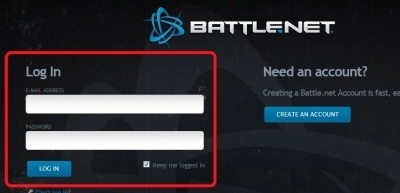
Click the image to open in full size.

It will prompt you to log in first. Your blizzard sc2 account works globally on all the region sites so just enter the userid/password you normally use to connect to battle.net. DO NOT create a new account as you will be asked for a Taiwan ID and that is not recommended. It is infinitely easier to just add your TW key to your existing account.

Click the image to open in full size.

After logging it, it will take you to the "Activate code" page directly. All you need to do is enter the activation code given to you in your sc2sea inbox!!

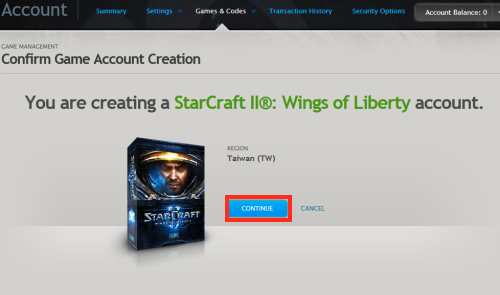
Click the image to open in full size.

They will prompt you to confirm and so click continue. Make sure the region shows Taiwan (Well of course it will show Taiwan!)

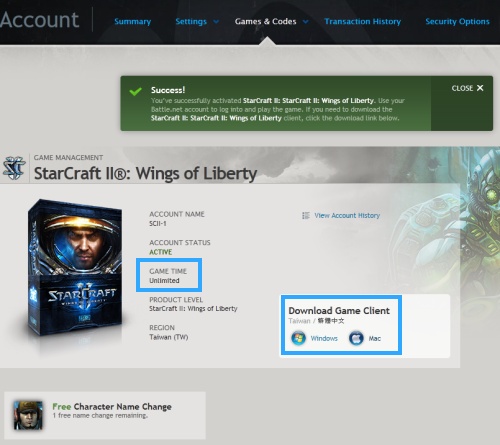
Click the image to open in full size.

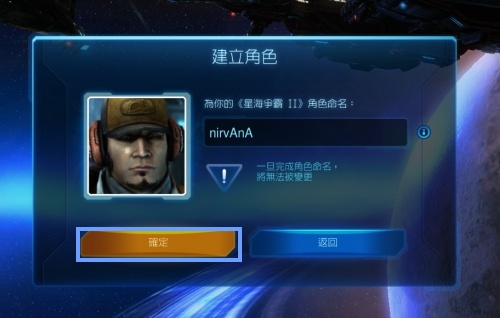
Success! You are now the proud owner of a Taiwan/KR account, and look you even have a free name change yay! Best of all you obtained it 100% legally, without fear of violating Blizzard's TOS. You can now download the appropriate installer for your operating system.


Step 2: Install the TW client! IMPORTANT, READ!


+ Show +
Aright so you have an account, what now? You have two options, download the official client on the page you are at now, or use a relocaliser.

The official client is 6GB and will take a few hours to download. However, with this method you won't have to worry about reinstall issues and corrupt versions that the relocalizer is notorious for, especially after patch changes. If you have the time and internet bandwidth I highly recommend this way of installing a new version of the TW Starcraft 2 client on your computer. I will only cover the official client install. Use of relocalizers falls into a "grey area" but I have provided some information to point you in the right direction if that is what you are after (or you lack in the internet bandwidth, have download issues, etc.) and it is covered at the bottom of this post.


Official Client Install:


Important: After patch 1.5 a few customers have mentioned Blizzard is directing them to download the KR client. This is WRONG. You need to download the Taiwan Client instead. Here are the official Blizzard links to download the client directly, you do not need to be logged in or buy the account yet and anyone can download it. Please use these links to ensure you download the right version.

TW Client Windows Version: http://dist.blizzard.com.edgesuite.n...Setup-zhTW.exe
TW Client Mac Version: http://dist.blizzard.com.edgesuite.n...Setup-zhTW.zip

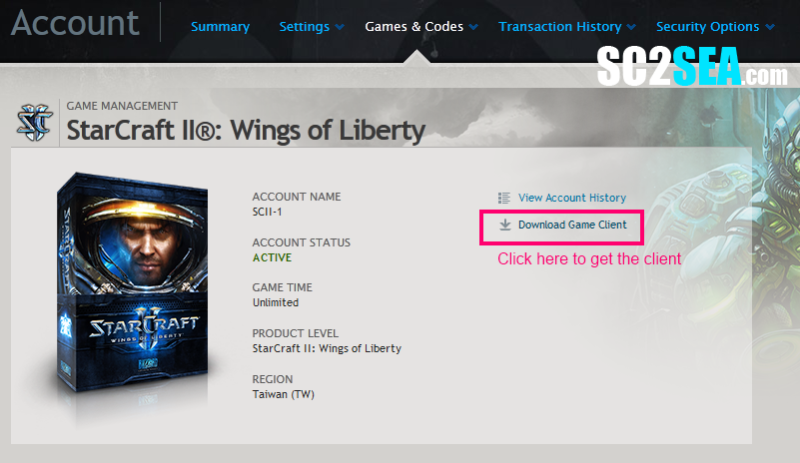
+ [Need help in finding the client from bnets website? Here are the screenshots to show you how] +


Login and go to https://us.battle.net/account/management/
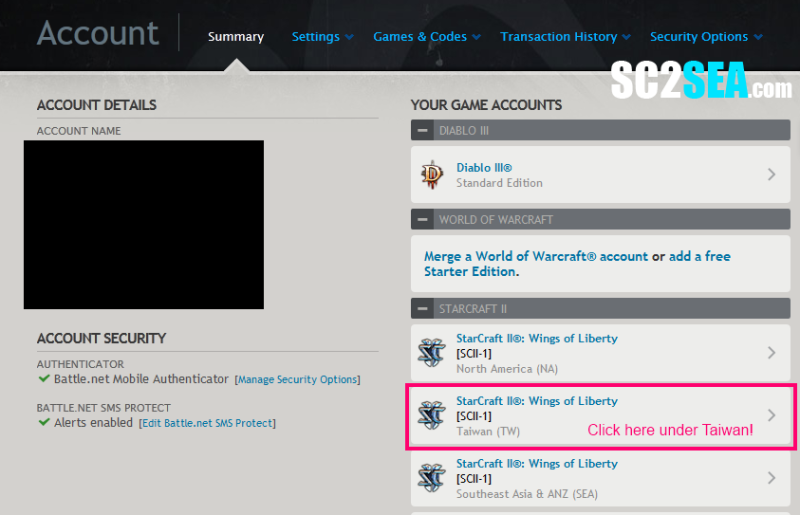
Click the image to open in full size.
Once your code was entered successfully you should see "Taiwan" under your SC2 game accounts.

Click the image to open in full size.

Click the image to open in full size.
After you save the region version you want, click Win or Mac. The file you download should end with zhTW.exe


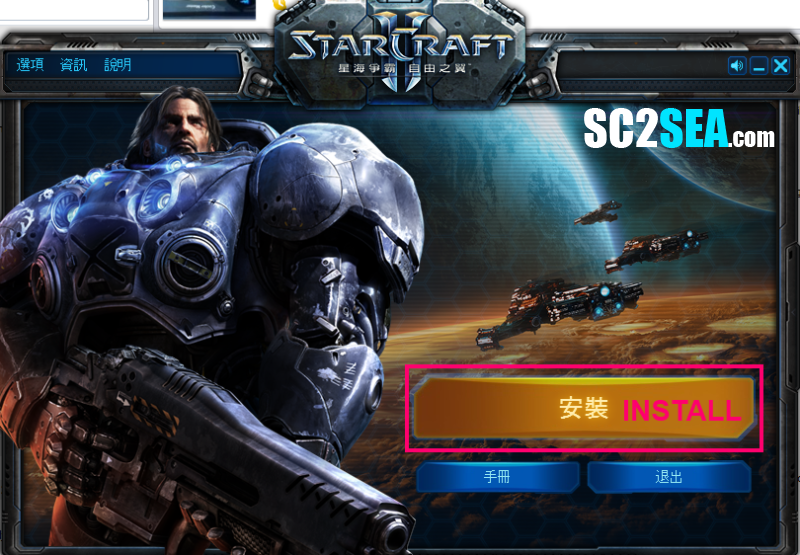
Note that a clean install generally takes at least 1-2 hours to set up depending on your internet speed. The steps are self explanatory after being translated. Note: I've updated the key areas with screenshots for the new UI after patch 1.5 but some of them are with the old interface. However, they are more or less the same and are easy to follow.

Click the image to open in full size.

Click the image to open in full size.

This is the most important step of the install:
Remember to choose a different folder to install Starcraft 2. Do this by clicking on the button, which will take you to a place where you can choose the directory to install it to. Right click on a blank area in the directory tree to create a new folder, and rename it to something for e.g "Starcraft KR" After that highlight that new directory and click select folder. If you forget to do this step the starcraft installation will overwrite your existing starcraft directory and corrupt your SEA/NA/EU installation. So CHANGE the installation folder!!!

Click the image to open in full size.
Click the bottom button. Basically it says you need a battle.net account to play starcraft 2. The first button just says go to battle.net if you dont have an account yet to apply your code. Second button says continue if you have your account activated already (you should have if you followed step 1 right) so click that.


Lastly, once you log on to the Taiwan client just agree to everything (left button) to continue. Great success! The end!

Click the image to open in full size.

Note: Once logged in on Korea, when you go under multiplayer the practice league is the left button at the bottom and "skip practice league" is the right button.


Patch 1.5 Issues:


+ [Language Pack Error] +

For those getting the "You need an authorized language pack" error

Open up this file in your documents folder with notepad
e.g
User\My Documents\Starcraft II\Variables.txt

Change the two locale variables to the appropriate client language e.g zhTW or enSG or enUS depending on which client you are using, Taiwan, SEA or NA.

Code:
localeidassets=zhTW
localeiddata=zhTW
Alternatively instead of putting "zhTW" put "????" and it will automatically detect which client u are using and use the appropriate language pack, really useful if u are using 2 clients so you don't have to keep switching.


+ [Language Pack issues with Macs] +
Fix 1: Without bootcamp - Credit to sfaf for the solution)

Go to (your username)>Library>Application Support>Blizzard>Starcraft II>Variables.txt

From there you can change these to:

localeidassets=zhTW
localeiddata=zhTW

or

localeidassets=????
localeiddata=????

The question marks is the better way imo and is tested and works for macs. Make sure you save the file.

Fix 2: Use a new account or bootcamp. - Credit to NoxGamer for alerting me to this and providing the solution

The language pack problem is a little more problematic on Mac. The Variable.txt is located under each account rather than the client (as it is on windows). Because the two clients are on the same account, the language packs conflict and it doesnt recognize the TW language pack.

This can be fixed my making a brand new SEA/NA account to apply your key to or by using bootcamp (more recommended). Bootcamp if you don't know allows you to run windows on a Mac and will also be very useful when encountering other programs that do not support Mac formats.


+ [I get some error in chinese! Help!] +

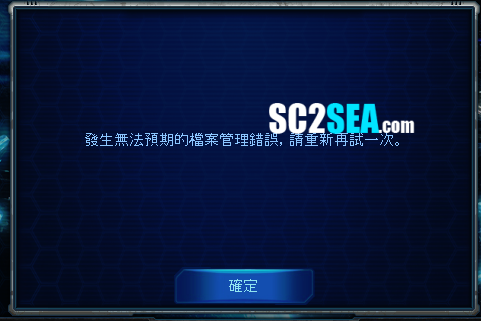
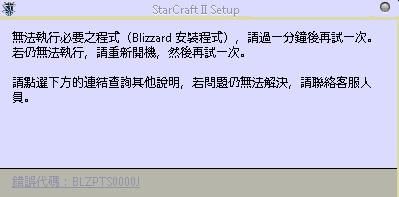
These errors are not common and you should not have to worry about them. But here they are in case, basically its all the errors our customers have ever run into.

Click the image to open in full size.

"Failed to download patch, please make sure you are connected to the internet"

You likely have your firewall still up for this blocking access to the game as its not dectecting the games network connection to the internet.

Click the image to open in full size.

"this is going to take a long time (15-60 mins), once it starts don't cancel it".

Basically the client needs to be patched / optimized. Left button to continue, right button to close. If you get another window with only one button after it's probably the one which says not enough free disk space; you need ~8/9 GB free for it to install the patch (just for the optimising process, you get it back afterward.credit: paperclip)

Click the image to open in full size.

For this error, the official custom support has been unable to help either and its likely patch 1.5 related so here is a work around method.

Work around method
(This assumes your current SC2 NA/SEA/EU client works perfectly.)

Step 1: Copy your whole working SC2 directory somewhere else, so you always have the original as a back up that works perfectly.

Step 2:
With the new directory you created, try using the relocaliser here and applying the relocaiser to it

http://www.teamliquid.net/forum/view...opic_id=357860

A few people with this problem have solved it this way as the "work around" method for now so its confirmed and tested.


FAQs:


+ Show +
Q: My SC2 installer gets stuck during the install at 1% and won't move anymore! Help!
This is because your SC2 CD is still in the CD-ROM drive and the installer is unsure if it should read from the CD or your hard drive. Simply take out the SC2 CD from your CD-ROM drive and try again.

Will I lag on the Korean server? First test your ping!
+ [Test your ping!] +
Before you decide to buy an account make sure to test your ping. If you're gonna lag hard on Korea, it simply won't be worth it to get an account. Although this is unlikely it is better to be safe than sorry! In most cases theres nothing to worry about because this isnt the era of 56kbps modems anymore and most of us have high speed internet! To begin, Click on Start (Windows Button) then type in CMD in the run box

Click the image to open in full size.

+ [Tracert demo] +

It doesn't matter which directory you are in, just type in "tracert us.battle.net", "tracert eu.battle.net" or "tracert sea.battle.net" depending on which server YOU are from to find out your current ping to your current server. For e.g if you're from the US, to make comparisons with the Korean and NA servers just type in "tracert kr.logon.battle.net" and "tracert us.battle.net" respectively. The simple way of interpreting tracert results is to look at the last few hops and compare them to each other. Generally anything under 250ms is playable but it also depends on your tolerance to lag. As a guideline you would want a relatively similar ping values from US/KR (so latency is similar as well) and to not exceed 300ms. But hey if you built up your lag tolerance and are used to playing at 300ms and get a similar result on KR it just means that you will be playing with the same level of latency there.

Note: For those unsure, the most accurate way to test your lag will be by requesting a free KR Guest Pass from us, the steps can be found at the bottom of this guide.

Click the image to open in full size.

Click the image to open in full size.

My case is slightly different because the SEA server is located in Singapore so all Singaporeans get about 12ms which is similar to LAN latency haha My ping to Korea is very acceptable at about 220ms. My ping to NA (not shown) is about 210ms so there is very little difference for me in playing on NA and KR, and both KR and NA latencies are definitely playable as they are quite far under 300ms. A cute story to share is xGkingnMafia laddered on SEA with a 350ms latency for the whole of last year. This is why his LAN tournament results (where uses a better ISP) are so much better than his online tournament results! Lag is an important factor for any competitive game


Q: I'm new to the site where is my PM inbox? How do I receive the code?
Your inbox is found at the top left hand corner of the site. In addition, when your code gets send you will be notified of the message through your email as well.

Q: I'm waiting for my keys to be in my inbox and i'm really bored! What can I do now?
To ensure minimum waiting time, my advice to you is to start downloading and patching the TW client from the official blizzard site right away by following this link. You do not need the Taiwan account to download the file so it makes sense to just download and patch the client first. The account activation will take less than 1 minute once you get your key

Windows Version: https://tw.battle.net/account/downlo...W&platform=win
Mac Version: https://tw.battle.net/account/downlo...W&platform=mac

+ [Optional: Download the latest patch to save more time] +
To save time from having to "patch" the game one by one you can start downloading the latest patch in advance. Just run the following files after you have installed the SC2 client and it will bring the game up to date with patch 1.4.2.
Windows: http://attdist.blizzard.com/starcraf...1.4.2-zhTW.exe
Mac: http://attdist.blizzard.com/starcraf...1.4.2-zhTW.zip


Q: I got threw the installer part, but when it got too showing the patches and stuff it was still in TW and then it displayed the patch notes in english help?! Aka when i start patching the client the language turns into English. Is this something i should worry about ?

Not to worry, it retrieves the battle.net news reads based on Internet cookies from the battle.net portal you visit, so its likely to display in English. If you installed it right the client will be in chinese after you install all the patches.

Q: I can't log in, is the Korean server up?
TL has an awesome thread where they keep track of the status here. Check it here first before PMing me. Obviously if the KR server happens to be down for maintenance you won't be able to log in, but it doesn't happen often and it lasts for a few hours when it does go down.

Q: Why not just buy if off the tw.battle.net site?
That's because you can't! Digital licenses work differently for the TW region and you need something called "MyCard points", which are extremely hard to find because you have to buy them in Taiwan Shops or only through giving out your credit card and identification documents to Chinese websites you have never heard off. We at sc2sea.com make it extremely easy by going to the official distributor directly.

Q: How will it be shipped to me?
It won't. This is the digital version. You will be PMed on sc2sea your unique key which will allow you to activate the region on your account and download the game, like how all digital versions work.

Q: I bought my account but still have not received my order. Help!
Please allow one day for payment verification purposes. You will receive a PM when your order has been processed so refresh sc2sea every few hours. If for some reason so you have not received your key after 2 working days, contact me here. and you will be compensated adequately.

Q: Do I need a new account?
No, you can have multiple regions / games activated on a single battle.net account, e.g an NA and a Taiwan license is fine. That was the "Revolution" of Bnet 2.0 to make it easy for users to keep track of their games. However, you can only have a single license per region. So if you want to have TWO Taiwan accounts for yourself, you need two battle.net accounts as well.

Q: Do I need a Korean or Taiwan ID?
Nope, as long as you have an existing account all you need to do is add your Taiwan account to it. If you wish to make a brand new account, make it on the NA/SEA website first as a new account rather than the TW website and from there just follow the tutorial.

Q: Do I need to reprogram my custom key set up?
Nope, if you bind the TW client to your main account, your custom hotkey setup follows you there.

Q: How do I change the Taiwan SC2 client to English?
That is not possible, and that is one of the limitations of the different Starcraft clients. It is in Traditional Chinese but based on your past experience, everything should be intuitive enough and easy to navigate, all hotkeys are the same, etc! If this is your first copy of SC2 i strongly recommend buying the NA/SEA one instead to get familiar with the game first then move on when you're ready for the land of Korea!

Update: Gerlan came up with a set of screen shots / tutorials if you plan to do keybinding/gfx control customization and need help with navigating the menus - check it out here!


Q: Can I use this account with a KR client?
Nope this is basically a Taiwan account so you will need to download and install the TW client and log in through it as well. So it will not work in Korea PC Bangs unless you bring your own USB drive and play from it. But once logged in, it shares the exact same server as the KR client.

Q: I still have questions! How can I get Customer Support? I need help!
Not to worry, contact me here or here and I will save the day.


Optional: Request for a free guest pass!

+ [How to request for one] +
The tracert guide as above should be accurate enough, but if you are still unsure of the latency and want a 7 hour / 14 day guest pass to test your connection out, simply fill up korean guest pass request form!

Note: To prevent abuse you would need a minimum of 10 posts and they have to be of a decent quality to be given a free guest pass. If you cannot access the form it means you do not meet the minimum post requirements. If you make 10 worthless posts with one line gibberish your request will be ignored. We are handing out free passes so c'mon, the least you should do is write proper stuff.


Optional: Playing with Korean sounds in patch 1.5!

+ [Patch 1.5] +
Use Simon's relocalizer here. It gives you the ability to play with sounds from any language, from Korean to English.


+ [Outdated pre-1.5 notes] +
Basically this makes your TW Client have Korean game sounds without violating any of Blizzard's TOS or using any third party applications. Credit goes to KAiZ3R who discovered this and made a thread about it on TL. I have tested it myself and it works as intended, but only adds the Korean SOUNDS and not the menu changes. The fantastic thing about it is it doesn't use any third party applications. This guide here will be heavily based on KAiZ3R's guide. Although it allows you to have any language sounds for any installation, we will only cover the way to let you have Korean sounds for the TW client installation because thats what we want here!

Step 1: Install the TW client as explained in this guide.
Step 2: Download this file - koKR.txt (Windows users: Right click on the words > save link as. Mac users: Command click on the link (hold the button with the apple, on the keyboard and click > save link as/ target as) and place it in the folder "versions" of the Starcraft2 directory you installed it in. i.e it should look like this

Windows Folder: C:\Program Files\StarCraft II TW\Versions\
Mac Folder: /Applications/StarCraft II TW

It should be in the same place as the folders named Base15405, Base16561, etc.

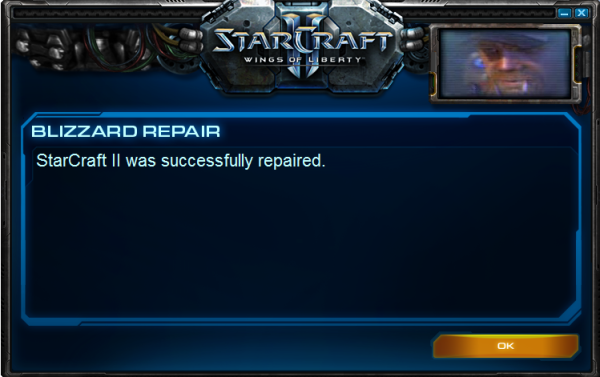
Step 3: Go back to your SC2 directory and this time to go to the support folder i.e C:\Program Files\StarCraft II TW\Support\ and run Repair.exe. If you did everything correctly, the main window will show that it has detected an extra locale and begin checking game files. Basically this tricks in game into thinking you have a Korean version of SC2 which was identified by the .txt file and it now begins downloading the sounds for it. The whole repair procedure will take about 2 hours to run. For me, the progress bar did not even come up till after 10 mins, so if it "hangs" just be patient and wait it out. It will look like this.

Click the image to open in full size.

Click the image to open in full size.

Step 4: Final step would be to edit your Variables.txt file.

On PC, it should be located within your My Documents folder at: C:\Users\YourNameXXX\Documents\StarCraft II\Variables.txt
On MAC, it will be at ~/Library/Application Support/Blizzard/StarCraft II/Variables.txt

Look for the line localeidassets=xxXX (If you're from NA xxXX will be called enUS, etc) and replace it with localeidassets=koKR.

The cool thing is this will not affect your other installations, whenever you run SC2 it will check the directory its running from so since there is no koKR.txt file in your NA/SEA/EU installation folder it will still have English voices and of course if you want them to have it just follow the same steps.

Credit again to KAiZ3R for discovering this.


Optional: Using a relocalizer!

+ [A working relocalizer on the latest patch] +
Update: Patch 1.5

Step 1: Copy your whole working SC2 directory somewhere else, so you always have the original as a back up that works perfectly.

Step 2:
With the new directory you created, try using the relocaliser here and applying the relocaiser to it

http://www.teamliquid.net/forum/view...opic_id=357860

People have played with this reloaciser already so its confirmed and tested to be working.

Pre-Patch 1.5

Basically a relocalizer allows you to have just "one" copy of Starcraft 2 installed on your computer. Each time you want to play on a different server, you run the relocalizer, which configured the files in that installation automatically for you, into those that suit the server you wish to play on.

Warning: We officially do not support the use of a relocalizer as it might be violating Blizzard's TOS so use it at your own risk and do not ask questions about it in this thread, they will be ignored. This relocalizer was last tested and found to be working by PurpleChef on 15th Feb 2012.

This is the relocailizer that LiquidJinro uses. Primadog does a very good writeup of it on TL here which has everything you need to know about it.

Before you begin - First step you should take is to copy and paste your current SC2 directory and call the new duplicate folder (SC2 relocalized). This way you will always have perfectly fine working backup to go back to should anything go wrong.

You should only be using this if
  • You have problems downloading the client.
  • Your have internet bandwidth / diskspace constraints.
  • You are prepared to reconfigure it every patch.

Remember that a new install with the official client will take longer but in the LONG-term it will save you a lot more time, whereas the relocalizer might be a "quick-fix" but every now and then you have to do the annoying process of updating or reinstalling SC2 as well as running it every time you wanna switch regions.


I hope your activation has been much easier with the help of this guide.

Feel free to use this thread to ask questions or to share your Korean account ID information with each other.


Need Customer Support?
PM Me
| Skype ME
  • PMing ensures I get notified faster. Please do NOT make a new thread, if i'm not online at that moment ask in the chatbox or post in this thread and someone will likely reply quickly.

Other SC2SEA Tutorials:
Buying Diablo 3 Digital Accounts
| Buying SEA/NA SC2 Accounts | TGM Starcraft 2 Guide


Quick Comments
 Maynarde:  
Helpful
 newbieta:  
 FaDeJameS:  
awesome thanks man running the patch now :D
 TAEdgE:  
great post mate
 LOSDoG:  
this is where i shall begin :)
 idiotech:  
 Soulja:  
Awesome!
 Mox:  
Sweet! I would have been screwed without this
 Muzial:  
You're a hero, Thanks for the great help.
 xGKingdelete:  
 VB_HpK:  
 Nerpster:  
Works 100%
 x5_Bard:  
Thanks really helped!
 R3mnant:  
 KamiGami:  
 Elevenapm:  
Helped me a lot. Thank you
 KFCrumpet:  
nirvana for international president
nirvAnA is offline Send a message via Skype™ to nirvAnA   OLD POST Reply With Quote
nirvAnA
View Public Profile
Send a private message to nirvAnA
Visit nirvAnA's homepage!
Find all posts by nirvAnA
Unread Wed, 15th-Feb-2012, 12:27 AM BnetId: PurpleChef.648  Race: Location: Ludvika, Sweden  Total Posts Made: 5 # 241
PurpleChef
Default Avatar
Did the transfer earlier today, and got my korea/taiwan account really fast!
My only problem is that blizzard downloader can't download "SC2-WingsOfLiberty-zhTW-Installer"
I get the message "The tracker is not responding." TT
PurpleChef is offline Send a message via Skype™ to PurpleChef   OLD POST Reply With Quote
PurpleChef
View Public Profile
Send a private message to PurpleChef
Visit PurpleChef's homepage!
Find all posts by PurpleChef
Unread Wed, 15th-Feb-2012, 12:29 AM BnetId: Exogenesis SEA: 881 NA: 625  Race: Location: Melbourne, Australia  Total Posts Made: 32 # 242
Exogenesis
Exogenesis's Avatar
Thanks for this!

I was wondering, how goes the latency in this region?

Thanks in advance!
Exogenesis is offline Send a message via Skype™ to Exogenesis   OLD POST Reply With Quote
Exogenesis
View Public Profile
Send a private message to Exogenesis
Find all posts by Exogenesis
Unread Wed, 15th-Feb-2012, 1:29 AM Who's Who:   BnetId: aLtnirvAnA.951  BattleTag: nirvAnA#1429  Race: Clan: aLt  Location: Singapore  Total Posts Made: 4,857 # 243
nirvAnA
Admin
nirvAnA's Avatar
Tourneys Joined / Won: 1/1
SC2SEA Supporter!Elementary my dear WatsonThe LegionnaireLetters to CleoThe GatekeeperCommunity Builder
Achievements (7)
Purplechef: To help people with problems downloading the client from the Taiwan host, I've added a US Mirror.

TW Client Windows Version (3.06 Mb)
TW Client Mac Version (3.8 Mb)

If you run the .exe and there is still no response it means the Blizzard server is down, but that is very rare so just try again later.

Exogenesis: Australians usually have no issues with the latency, and its similar to what they get on SEA. I've sent you a free guest pass so you can test this for yourself just to be sure. Check your privaite message in your inbox!
nirvAnA is offline Send a message via Skype™ to nirvAnA   OLD POST Reply With Quote
nirvAnA
View Public Profile
Send a private message to nirvAnA
Visit nirvAnA's homepage!
Find all posts by nirvAnA
Unread Wed, 15th-Feb-2012, 1:46 AM BnetId: 917  Race: Location: Australia  Total Posts Made: 4 # 244
workwork
Default Avatar
Hi, I was wondering if i would be able to get a free pass guest!
workwork is offline   OLD POST Reply With Quote
workwork
View Public Profile
Send a private message to workwork
Find all posts by workwork
Unread Wed, 15th-Feb-2012, 1:48 AM Who's Who:   BnetId: aLtnirvAnA.951  BattleTag: nirvAnA#1429  Race: Clan: aLt  Location: Singapore  Total Posts Made: 4,857 # 245
nirvAnA
Admin
nirvAnA's Avatar
Tourneys Joined / Won: 1/1
SC2SEA Supporter!Elementary my dear WatsonThe LegionnaireLetters to CleoThe GatekeeperCommunity Builder
Achievements (7)
A free guest pass has been sent your way. Enjoy
nirvAnA is offline Send a message via Skype™ to nirvAnA   OLD POST Reply With Quote
nirvAnA
View Public Profile
Send a private message to nirvAnA
Visit nirvAnA's homepage!
Find all posts by nirvAnA
Unread Wed, 15th-Feb-2012, 3:03 AM BnetId: PurpleChef.648  Race: Location: Ludvika, Sweden  Total Posts Made: 5 # 246
PurpleChef
Default Avatar
Quote:
Originally Posted by nirvAnA View Post
Purplechef: To help people with problems downloading the client from the Taiwan host, I've added a US Mirror.

TW Client Windows Version (3.06 Mb)
TW Client Mac Version (3.8 Mb)

If you run the .exe and there is still no response it means the Blizzard server is down, but that is very rare so just try again later.

Exogenesis: Australians usually have no issues with the latency, and its similar to what they get on SEA. I've sent you a free guest pass so you can test this for yourself just to be sure. Check your privaite message in your inbox!

Did try to download Warcraft 3, no problems!
Did even try "Full Game Client* Southeast Asia & ANZ / English (SG)"
and it workst at first try.

Only TW client who wont DL...
PurpleChef is offline Send a message via Skype™ to PurpleChef   OLD POST Reply With Quote
PurpleChef
View Public Profile
Send a private message to PurpleChef
Visit PurpleChef's homepage!
Find all posts by PurpleChef
Unread Wed, 15th-Feb-2012, 3:37 AM Who's Who:   BnetId: aLtnirvAnA.951  BattleTag: nirvAnA#1429  Race: Clan: aLt  Location: Singapore  Total Posts Made: 4,857 # 247
nirvAnA
Admin
nirvAnA's Avatar
Tourneys Joined / Won: 1/1
SC2SEA Supporter!Elementary my dear WatsonThe LegionnaireLetters to CleoThe GatekeeperCommunity Builder
Achievements (7)
Thats really strange! Does it work in that new link ive posted?
nirvAnA is offline Send a message via Skype™ to nirvAnA   OLD POST Reply With Quote
nirvAnA
View Public Profile
Send a private message to nirvAnA
Visit nirvAnA's homepage!
Find all posts by nirvAnA
Unread Wed, 15th-Feb-2012, 3:51 AM BnetId: PurpleChef.648  Race: Location: Ludvika, Sweden  Total Posts Made: 5 # 248
PurpleChef
Default Avatar
Quote:
Originally Posted by nirvAnA View Post
Thats really strange! Does it work in that new link ive posted?
No, it dosn't.
Heres my log from downloader

02/14/12 19:48:54.0952 Downloader initializing...
02/14/12 19:48:54.0954 Loading meta data file...

02/14/12 19:48:54.0981 Creating Firewall interface
02/14/12 19:48:54.0983 Success!
02/14/12 19:48:54.0984 Enabling Microsoft Firewall UPnP Framework
02/14/12 19:48:54.0986 Success!
02/14/12 19:48:54.0987 Enabling Blizzard Downloader on Windows Firewall
02/14/12 19:48:54.0988 Success!
02/14/12 19:48:54.0989 Creating Firewall interface
02/14/12 19:48:54.0990 Success!
02/14/12 19:48:54.0991 Creating Microsoft Firewall Rule: Blizzard Downloader: 6881
02/14/12 19:48:54.0993 Success!
02/14/12 19:48:54.0994 Not found Bonjour service.
02/14/12 19:48:54.0995 Creating UPnP interface
02/14/12 19:48:54.0998 Getting UPnPDevice Information
02/14/12 19:48:54.0999 Connecting to: http://tw.tracker.worldofwarcraft.com:3724/announce with 1
02/14/12 19:48:54.1001 UPnP device Found:
02/14/12 19:48:54.1002 Manufacturer: ZyXEL
02/14/12 19:48:54.1004 Model: P-2601HN-F1
02/14/12 19:48:54.1005 Model Number: V3.00(BLR.3)
02/14/12 19:48:54.1006 Device URL: http://www.zyxel.com/
02/14/12 19:48:54.1007 Could not find port mappings on UPnP Device.
02/14/12 19:48:54.1009 Add UPnP Device port forward: 6881
02/14/12 19:48:54.1010 External port has been successfully mapped.
02/14/12 19:48:58.9264 Failed to connect to tracker.
PurpleChef is offline Send a message via Skype™ to PurpleChef   OLD POST Reply With Quote
PurpleChef
View Public Profile
Send a private message to PurpleChef
Visit PurpleChef's homepage!
Find all posts by PurpleChef
Unread Wed, 15th-Feb-2012, 4:20 AM Who's Who:   BnetId: aLtnirvAnA.951  BattleTag: nirvAnA#1429  Race: Clan: aLt  Location: Singapore  Total Posts Made: 4,857 # 249
nirvAnA
Admin
nirvAnA's Avatar
Tourneys Joined / Won: 1/1
SC2SEA Supporter!Elementary my dear WatsonThe LegionnaireLetters to CleoThe GatekeeperCommunity Builder
Achievements (7)
Seems like a Internet settings issue. Here are the common solutions for it.

Try this

Solution 1:


Go to the Control Panel and open up Internet Options.
Click on the Connections tab.
Click the button called "LAN Settings"
Uncheck all of the options on that screen.

Then try again.

If that does not work, go back in and check the box to "Automatically Detect Settings" and test once more.

Solution 2:

When you're in IE making sure you're not in a proxy, etc. etc., make sure you're cookie settings are set to at least medium.

Solution 3:

1. Try temporarily disabling your anti-virus\firewall, as simply allowing the downloader sometimes doesn't cut it.
2. Make sure you're running the download as an Administrator.

Look over your firewall and security software to be sure they're allowing the Downloader access to the Internet. What types of security software do you have?

Solution 4:

See: http://us.battle.net/sc2/en/forum/topic/13501355#1 for more troubleshooting steps.
nirvAnA is offline Send a message via Skype™ to nirvAnA   OLD POST Reply With Quote
nirvAnA
View Public Profile
Send a private message to nirvAnA
Visit nirvAnA's homepage!
Find all posts by nirvAnA
Unread Wed, 15th-Feb-2012, 5:06 AM BnetId: PurpleChef.648  Race: Location: Ludvika, Sweden  Total Posts Made: 5 # 250
PurpleChef
Default Avatar
Quote:
Originally Posted by nirvAnA View Post
Seems like a Internet settings issue. Here are the common solutions for it.

Try this

Solution 1:


Go to the Control Panel and open up Internet Options.
Click on the Connections tab.
Click the button called "LAN Settings"
Uncheck all of the options on that screen.

Then try again.

If that does not work, go back in and check the box to "Automatically Detect Settings" and test once more.

Solution 2:

When you're in IE making sure you're not in a proxy, etc. etc., make sure you're cookie settings are set to at least medium.

Solution 3:

1. Try temporarily disabling your anti-virus\firewall, as simply allowing the downloader sometimes doesn't cut it.
2. Make sure you're running the download as an Administrator.

Look over your firewall and security software to be sure they're allowing the Downloader access to the Internet. What types of security software do you have?

Solution 4:

See: http://us.battle.net/sc2/en/forum/topic/13501355#1 for more troubleshooting steps.
Ive tryed every possible solution, nothing works. That is the only installer who won't work..

Did try with windows firewall/on/off/trusted program and now with COMODO, but still no luck.

How is it possible TT
PurpleChef is offline Send a message via Skype™ to PurpleChef   OLD POST Reply With Quote
PurpleChef
View Public Profile
Send a private message to PurpleChef
Visit PurpleChef's homepage!
Find all posts by PurpleChef
Unread Wed, 15th-Feb-2012, 6:08 AM BnetId: PurpleChef.648  Race: Location: Ludvika, Sweden  Total Posts Made: 5 # 251
PurpleChef
Default Avatar
Oh nvm, somebody told me to use this relocalizer http://www.teamliquid.net/blogs/viewblog.php?id=283483
problem solved!
PurpleChef is offline Send a message via Skype™ to PurpleChef   OLD POST Reply With Quote
PurpleChef
View Public Profile
Send a private message to PurpleChef
Visit PurpleChef's homepage!
Find all posts by PurpleChef
Unread Wed, 15th-Feb-2012, 2:02 PM BnetId: Exogenesis SEA: 881 NA: 625  Race: Location: Melbourne, Australia  Total Posts Made: 32 # 252
Exogenesis
Exogenesis's Avatar
Thanks Nirvana! You're the man Will be trying it out tonight after work.
Exogenesis is offline Send a message via Skype™ to Exogenesis   OLD POST Reply With Quote
Exogenesis
View Public Profile
Send a private message to Exogenesis
Find all posts by Exogenesis
Unread Wed, 15th-Feb-2012, 11:39 PM BnetId: Byuu.294  Race: Location: Canada  Total Posts Made: 2 # 253
Byuu
Default Avatar
This guide is perfect, got my acc up and running in 5 min. I would recommend this product to anyone
Byuu is offline   OLD POST Reply With Quote
Byuu
View Public Profile
Send a private message to Byuu
Find all posts by Byuu
Unread Sun, 19th-Feb-2012, 10:15 PM BnetId: MilkyMan.878  Race: Clan: TCP  Location: Hong Kong  Total Posts Made: 31 # 254
TCPMilkyMan
Default Avatar
Quote:
Originally Posted by Maynarde View Post
Thanks for this Nirv
Note that you should probably add:

If you have the Starcraft 2 DVD with the SEA / NA version on it, the TW client will NOT INSTALL. Took me ages to figure it out, I had the DVD in there so I could see the install options in English and make sure I hit the right buttons. Left the DVD in the drive and just scratched my head for hours over why the TW client wasn't installing past %1 completion.
DAMN I SHOULD HAVE READ THIS BEFORE I WAS INSTALLING...

I had the same problem and figured out the problem 2 weeks later -,-
TCPMilkyMan is offline   OLD POST Reply With Quote
TCPMilkyMan
View Public Profile
Send a private message to TCPMilkyMan
Find all posts by TCPMilkyMan
Unread Sun, 19th-Feb-2012, 10:20 PM Who's Who:   BnetId: aLtnirvAnA.951  BattleTag: nirvAnA#1429  Race: Clan: aLt  Location: Singapore  Total Posts Made: 4,857 # 255
nirvAnA
Admin
nirvAnA's Avatar
Tourneys Joined / Won: 1/1
SC2SEA Supporter!Elementary my dear WatsonThe LegionnaireLetters to CleoThe GatekeeperCommunity Builder
Achievements (7)
It is added in the guide under FAQ, just that no one ever reads!

Quick Comments
 iMSystem:  
I feel your pain
nirvAnA is offline Send a message via Skype™ to nirvAnA   OLD POST Reply With Quote
nirvAnA
View Public Profile
Send a private message to nirvAnA
Visit nirvAnA's homepage!
Find all posts by nirvAnA
Unread Sun, 26th-Feb-2012, 10:22 PM BnetId: Crayolalax.373  Race: Location: Brisbane, Australia  Total Posts Made: 5 # 256
crayolalax
Default Avatar
Everything went fast and smooth, and works like a charm.

Cheers Nirvana x)
crayolalax is offline   OLD POST Reply With Quote
crayolalax
View Public Profile
Send a private message to crayolalax
Find all posts by crayolalax
Unread Mon, 27th-Feb-2012, 6:21 AM Race: Total Posts Made: 1 # 257
darks0ck
Default Avatar
Everything was as described! Worked perfectly
darks0ck is offline   OLD POST Reply With Quote
darks0ck
View Public Profile
Send a private message to darks0ck
Find all posts by darks0ck
Unread Mon, 27th-Feb-2012, 9:15 PM BnetId: Exogenesis SEA: 881 NA: 625  Race: Location: Melbourne, Australia  Total Posts Made: 32 # 258
Exogenesis
Exogenesis's Avatar
Hey Nirvana Just wanted to say thank you for the guest pass.

I tried it out and I'm very please with the results. I will be purchasing a key in the near future.

Thanks again!
Exogenesis is offline Send a message via Skype™ to Exogenesis   OLD POST Reply With Quote
Exogenesis
View Public Profile
Send a private message to Exogenesis
Find all posts by Exogenesis
Unread Thu, 1st-Mar-2012, 2:02 AM BnetId: Poebes.866  Race: Location: Holland ,Groningen  Total Posts Made: 11 # 259
Poebes
Default Avatar
Heey awesome man thanks for the help. Just going to request a guest pass to see how the lag feels like and then decide if im going to buy a client. Already have the kr one installed.
Thanks!!
Edit: nvm i found out.

Last edited by Poebes; Thu, 1st-Mar-2012 at 3:36 AM.
Poebes is offline   OLD POST Reply With Quote
Poebes
View Public Profile
Send a private message to Poebes
Find all posts by Poebes
Unread Thu, 1st-Mar-2012, 10:51 AM BnetId: munchie 239  Race: Location: canada  Total Posts Made: 1 # 260
jibby
Default Avatar
very well done

though paypal held my payment for what seemed like for ever this site did a great job and it works amazing for me almost no lag or anything well worth it
jibby is offline   OLD POST Reply With Quote
jibby
View Public Profile
Send a private message to jibby
Find all posts by jibby

Reply
Page 13 of 20 « First < 3456789101112 13 14151617181920 > All

« Previous Article | Next Article »
Article Tools
Show Printable Version Show Printable Version
Email this Page Email this Page
Display Modes
Linear Mode Linear Mode
Hybrid Mode Switch to Hybrid Mode
Threaded Mode Switch to Threaded Mode


Similar Articles
Article Author Forum Replies Last Post
Tutorial: How to legally buy a sc2 korean account. GnSMiCron Starcraft 2 General Discussion 33 Thu, 10th-Nov-2011 4:36 PM
[Q] Trying to buy a Korean account myth_au Starcraft 2 General Discussion 13 Sat, 25th-Jun-2011 4:50 PM
YoonYJ account for Sale YJY Closed Threads 56 Thu, 24th-Feb-2011 10:14 PM
Setting up your US account , KOTH day#2 and Singapore Starcraft League nirvAnA Latest News 5 Thu, 23rd-Sep-2010 12:03 PM

Events
Upcoming Events Add
No events scheduled in
the next 7 days.
OSC SEA Participation Bonus
Live Streams
No streams online.
Open SEABets
No open bets.
2015 OSEANIC Series
Latest Results
Americas Open #110 KeeN
OSC SEA Weekly #24 Probe
SC2Online Comm Open #38 aLive
February EU Ladder Heroes Nerchio
February NA Ladder Heroes TRUE
ANZ Cup #12 iaguz
Filthy NA Weekly #16 Semper
Proxy Tempest Open #43 PiLiPiLi
Top 20 OSC Rankings
1ByuN
2Seither
3DemiLove
4PiLiPiLi
5Kelazhur
6Cham
7iaguz
8aLive
9Solar
10KeeN
11EnDerr
12KingkOng
13TRUE
14GuMiho
15Probe
16puCK
17Snute
18PandaBearMe
19PiG
20Ryung
Full Point Standings
Earn extra points with Challenge Matches!
Bounties
Defeat these players and collect the $'s!
ByuN$100
INnoVation$75
Solar$75
Neeb$60
herO$50
GuMiho$50
Nerchio$50
TRUE$50
uThermal$50
Kelazhur$40
MajOr$40
Scarlett$40
Snute$40
aLive$30
Bly$30
iAsonu$30
KeeN$30
PiLiPiLi$30
puCK$30
Ryung$30
Cham$25
Cyan$25
iaguz$25
Guru$25
Seither$25
Semper$25
JonSnow$15
PandaBearMe$15
Probe$15
Latest Collected
Yours 2-0 Neeb $60
SC2ONLINE Comm Open #38
Azure 2-0 Seither $25
ANZ Cup #12
Cham 2-0 Cyan $25
OSC All Stars #24
FuturE 2-0 KeeN $30
ESL Americas Open #109
Donations
Donate using Paypal!

Even the smallest donations help keep sc2sea running! All donations go towards helping our site run including our monthly server hosting fees and sc2sea sponsored community tournaments we host. Find out more here.
Home - Contact Us - FAQ - Members List - Advertise - Terms of Service - Top - Mobile-friendly (alpha)
Powered by vBadvanced CMPS v3.2.2
Powered by vBulletin® Version 3.8.7
Copyright ©2000 - 2026, vBulletin Solutions, Inc.
The contents of this webpage are copyright of sc2sea.com © 2010-2015. All Rights Reserved.
The Grandmaster Manual is a Starcraft 2 Guide created and owned by sc2sea.com
Starcraft2 is a trademark of Blizzard Entertainment, this is a community fan site and no infringement is intended.
Custom artwork by Zeus, Banner designed by Cute, other artworks is used with permission with credits listed here. vBulletin skin by CompletevB.com